Builds / recipe
Build your own career compass
A page for the days when work feels stuck. You write down what's going on, add your CV if you like, and get a plain-language read of your situation plus a few different paths forward, each with steps small enough to start tonight. Unstick yourself :)
- Status
- Basic
- Size
- Small build
- Runs in
- a Claude chat that can publish Artifacts
Original by José Martín Quesada. Career Compass is José's open-source app (code on GitHub, MIT licence). The recipe describes how it behaves, not his code.
Try a default build (every answer left at "keep default"; opens on claude.ai)
What it will ask you
- Who is it mainly for: you, people near burnout, career changers?
- Which kinds of path should it suggest, and how many?
- What tone should the write-up take?
- Should it take a CV or profile text?
About a dozen questions in all, each with a default, so "keep default" always works. Every answer stays editable in the app afterwards.
What's already decided
- Nothing is stored: close the page and it's gone.
- It reflects what you wrote and says plainly that it isn't a diagnosis.
- Claude writes the words and the page owns the structure, so ticking one step never ticks another.
Before you start
- You need
- A Claude account that can publish Artifacts and let pages call Claude.
- Usage
- Each read of your situation is one Claude call on the most capable model, counted against whoever runs it.
How to use it
- Copy the recipe with the button below.
- Paste it as the first message in a new Claude chat.
- Answer the questions, say yes to the plan, and Claude builds it.
Read the whole recipe
/anthropic-skills:grill-me
Build me a career "unsticker" as a claude.ai Artifact, tailored to me: I write down what is going wrong at work, optionally add my CV, and get back a plain-language read of my situation and a few distinct paths forward, each with steps I can start tonight and a phased roadmap. The rest of this message describes the app. Interview me first, then write the spec, get my yes, build, and check the result against the spec.
If the grill-me skill is not available, run the same process yourself: ask the interview questions below a few at a time, write a short spec with acceptance tests, wait for my yes, then build.
0. Check before the interview
The app needs Artifact publishing, plus the runtime capabilities sample (the page calls Claude) and downloads (the page offers the plan as a file). Load the artifact-capabilities and artifact-design skills. If the Artifact tool or either capability is missing, stop now and tell me, before asking any questions. Where these skills disagree with an API detail in this message, follow the skills.
1. What to ask me
Keep to about 12 questions. Offer a default for each so I can answer quickly with "keep default". Sections 2 to 7 are already decided, so do not ask about them.
Every answer becomes an editable default in Settings (a field, toggle or list), never a constant hard-coded in logic. Anything you decide for me without asking goes in the spec as an assumption and is also editable in Settings.
- Who will use it? (Default: me, and anyone I share the link with. Each viewer's text goes to Claude under their own account.)
- Who is it mainly for? (Default: anyone who feels stuck at work. Options include people near burnout, early-career people, career changers, managers.)
- Tone of the write-up. (Default: warm and direct, validating without pep talk or flattery.)
- Which kinds of path should it offer? (Default: one "stay and fix", one "pivot", one "step away or break", with the model free to rename them. Alternative: let the model choose freely.)
- How many paths? (Default 3, allowed 2 to 4.)
- Language, and the country or job market the advice should assume. (Default: English, no country assumed; the model avoids country-specific legal or tax claims.)
- Optional context inputs to offer. (Default: both on: a CV upload as PDF or plain text, and a box to paste profile text such as a LinkedIn About and experience section.)
- Networking helpers on roadmap steps: suggested kinds of people to talk to, a search query and a draft outreach message. (Default: on; the platform named in the query defaults to LinkedIn.)
- Size of the "start tonight" steps. (Default: each doable in under 30 minutes.)
- "Download my plan" button. (Default: on, Markdown file.)
- Model effort for the analysis. (Default: the most capable tier.)
- A name and a visual mood. (Default: "Unstuck", calm dark look; "you pick" is a fine answer. A dark neon glass style is one option, not a requirement.)
2. Core rules
- Nothing is stored. The page keeps my answers and the result in memory only. Reloading or closing starts over. The only way anything leaves the session is a download I confirm. Reason: a CV and a description of a bad job are sensitive, and a plan nobody saved can't leak.
- Honest privacy copy. The welcome screen says plainly: nothing is stored, and your text is sent to Claude to write your plan. Never say "completely confidential". Never show a button that pretends to save (the original had one that only showed a toast; it was removed for that reason).
- This is not a diagnosis in the medical sense. The diagnosis screen always shows: "This is a reflection of what you wrote, not a medical, mental-health, legal or financial assessment." Call the items "what I'm hearing" or themes, not conditions. If my text shows signs of crisis, self-harm or severe distress, the model must open the summary with a short, kind note suggesting I talk to a professional or local emergency services, before anything else, and must not suggest high-risk moves as the first path.
- The model writes words; the page owns structure. Ids, counts, ordering and ticked state are set by the page, never trusted from the model.
- One analysis per submission. A run starts only when I press the final Next, and leaving the processing screen cancels it.
3. The flow
Screens in order, with a progress bar across the four input and result steps:
- Welcome. What it does in one line, the three steps (share what's on your mind, get a clear read, get concrete plans), the privacy line from rule 2, and Get started.
- Brain dump. One large text box: "Tell me what's happening at work. Type for 1 to 3 minutes; don't worry about structure." A live character count, and Next stays disabled until at least 50 characters, with a hint of how many more are needed. The brain dump is required: there is no Skip on this screen (the original had one that bounced you straight back).
- Context (optional). A CV upload (PDF or .txt, up to 5 MB; larger files are refused with a message) and a box to paste profile text. Never fetch or scrape any profile URL: that breaks the site's terms. A "Skip this step" button and Next.
- Processing. Read the CV in the browser first (PDF text extracted page by page with pdf.js; .txt read directly). If the CV can't be read, show "Could not read your CV, continuing without it" and carry on. Then make the analysis call and show a few calm status lines. On failure, go back to the brain dump with a clear error and my text still in the box.
- What I'm hearing. The themes as cards: a short label, one sentence, and an intensity of 1 to 3 shown as three dots. Below, the summary paragraph. The disclaimer from rule 3. Buttons: "Edit my story" (back to the brain dump with my text intact) and "See possible paths".
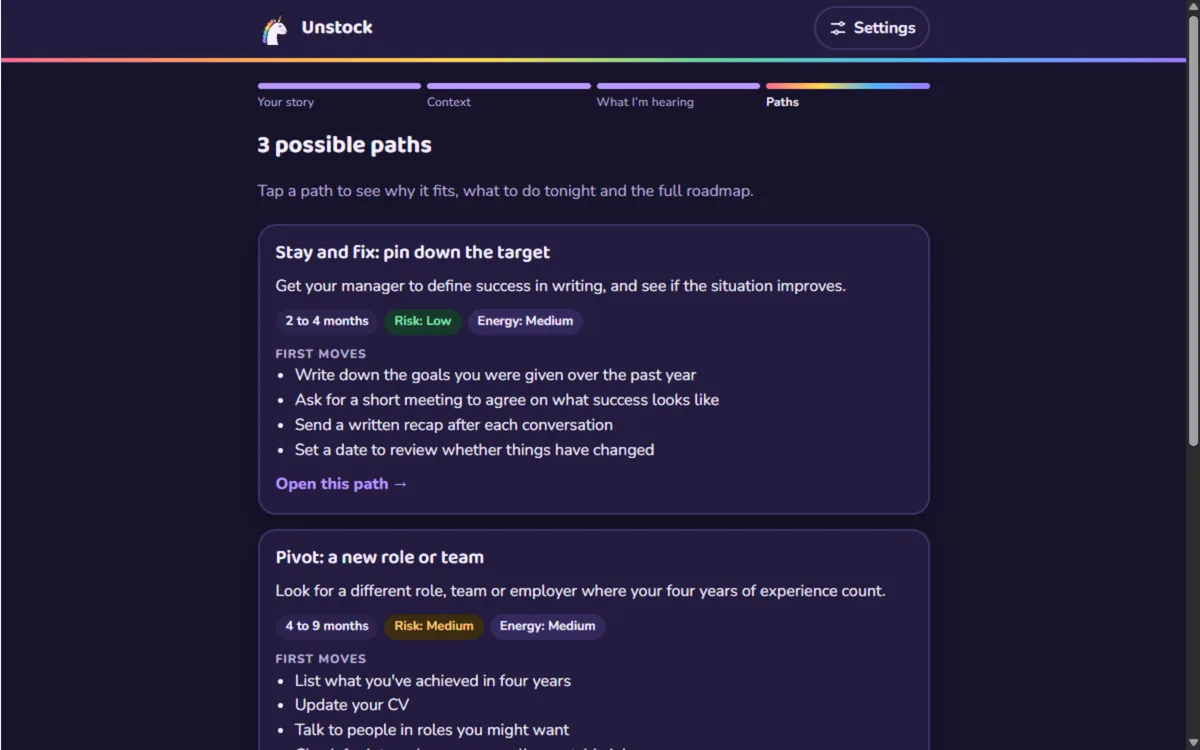
- Paths. One card per path: name, one-line description, badges for time horizon, risk (Low, Medium, High, colour-coded) and energy needed (Low, Medium, High), and the first moves as a short list. Tapping a card opens its detail.
- Path detail. The path's name and badges; why this path fits me; "Start tonight" as a numbered list; then the full roadmap as collapsible phases, the first one open. Each roadmap step shows a title, a category tag, why it matters, and how to do it as bullet steps. When present: kinds of people to talk to (role plus an example kind of company), a search query and a draft outreach message, the last two with a copy button and a "Copied" confirmation. Every step has a checkbox I can tick. Buttons: "See other paths" and, if on, "Download my plan".
Back buttons on every screen keep everything I entered: going back and forward must never empty the brain dump, the CV or the pasted text (the original lost them).
4. The analysis call
One sample call per run, at the tier from question 11, asking for JSON only. The prompt contains: the role ("an experienced career strategist for <audience from Q2>"), the tone, the language and market, my brain dump, the CV text or "No CV provided", the pasted profile text or "None provided", and the task:
- Identify the core themes in my situation (start with 2 to 5), each with a label, one sentence and an intensity from 1 to 3.
- Write a short summary of my situation in the chosen tone.
- Create the configured number of distinct paths, of the configured kinds.
- For each path: name, one-line description, time horizon (for example "6 to 12 months"), risk and energy (Low, Medium or High), why it fits, 2 to 4 first moves, 2 to 4 "start tonight" actions of the configured size, and a roadmap of phases (start with 2 to 4), each with steps. A step has a title, a tag, why it matters, how-to bullets, and optionally people to talk to, a search query and an outreach draft (only when networking helpers are on).
- The safety instruction from rule 3.
Cap the inputs before sending: brain dump at 20,000 characters, CV text at 40,000, pasted profile text at 10,000 (start with these, editable). Tell me in the UI when something was cut.
Checking the reply (repair, then retry once):
- Strip code fences, then parse. Unparseable counts as a failure.
- Required: a non-empty summary and at least one path with a name. Missing either is a failure.
- Repair everything else: missing lists become empty lists; intensity is clamped to 1 to 3; risk and energy that aren't Low, Medium or High hide that badge; extra paths beyond the configured count are dropped; fewer paths are shown as they came.
- The page assigns its own ids to every path, phase and step (the model tends to reuse ids like "a1" in every phase, which made ticking one step tick another in the original).
- On a failure, retry once automatically. If the retry also fails, show an error with a "Try again" button and keep all my input.
- If
sampleis unavailable or I decline consent, say the page needs permission to ask Claude and how to grant it; onrate_limited, say to wait a minute. Never retry in a loop.
5. Download my plan
When on, "Download my plan" saves a Markdown file through downloads: the summary, the themes, and every path with its badges, start-tonight list and roadmap, ticked steps marked [x]. It never includes the brain dump, the CV text or the pasted profile text. The file is named after the app and today's date. If I decline the save, nothing happens and no error is shown.
6. Technical
One self-contained page, published privately, capabilities {sample: {}, downloads: true}. Develop as separate source files built into a single HTML file: pure logic with no DOM or network (prompt building, input caps, reply parsing, repair and validation, id assignment, Markdown export), the model call with sample injected, UI and state, styles. Do not minify, and write a short comment explaining why for every rule, number and fix.
Load pdf.js from cdnjs with a pinned version, and its worker from the same place. All model text and all of my text are rendered as text, never as HTML. Mobile first with large tap targets, works in light and dark mode. Settings holds every interview answer and is reachable from every screen; changing it never deletes a result already on screen.
7. Definition of done
Write automated tests for the pure logic and the pipeline, using a stand-in model that also returns bad output. Check Node first, and ask me before installing anything. The tests must cover at least:
- a normal reply renders all screens' data correctly
- a reply wrapped in a json code fence parses
- a reply missing optional fields (no phases, no first moves, no outreach) is repaired without errors
- a reply with no summary, or no named path, or not JSON, triggers exactly one retry, then the error with my input kept
- two phases whose steps both have the id "a1": ticking one does not tick the other
- intensity 0 and 7 clamp to 1 and 3; risk "Extreme" hides the badge
- 5 paths returned with a setting of 3 shows 3
- the brain dump at 49 characters can't continue and at 50 can
- inputs over the caps are cut and the cut is reported
- the Markdown export contains the ticks and never the brain dump or CV text
- an unreadable CV continues without it and says so
Run the page locally with the stand-in and click through every screen at phone and desktop widths, including Back from every screen with all inputs filled. If you drive a headless browser, launch it so it never asks for an OS keyring or password (Chromium: --password-store=basic --use-mock-keychain). Never publish the stand-in. Then publish, and give me the link.
The stand-in cannot prove real advice quality, so report plainly what you tested and what you did not. Then walk me through a live test: first a short, ordinary brain dump with no CV; then a long one with a real-looking PDF CV (a made-up one is fine); then check by hand that the paths really differ from each other, that the "start tonight" steps are small enough to do tonight, and that the disclaimer shows. Fix what fails.
Made with the recipe plugin. Back to Builds